Any web EMR
Axxess, HCHB, WellSky, Kinnser, WebPT and the rest. If it opens in Chrome or Microsoft Edge, Tytan can fill it. No integration to wait for.
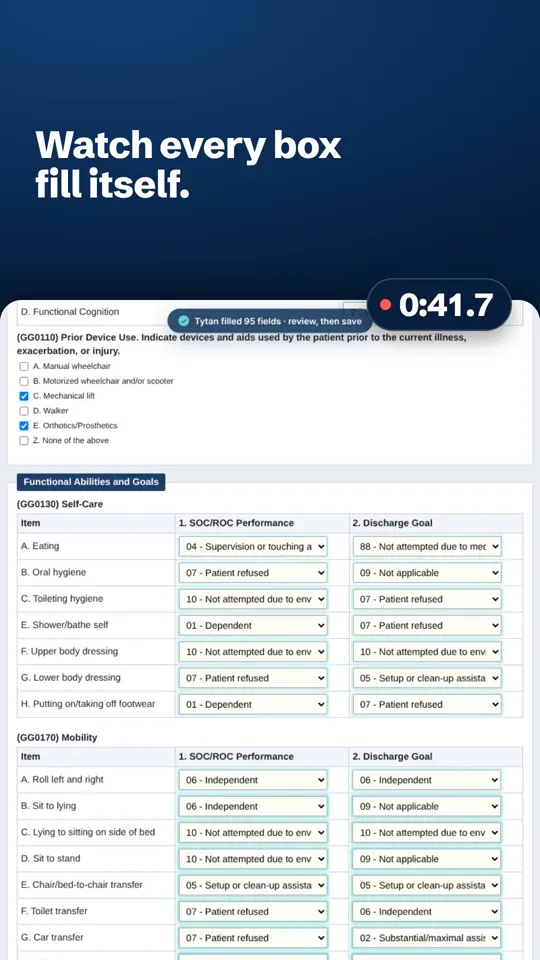
Tytan's browser extension sits beside your EMR. Give it last visit's note, a PDF, a scan or a photo of paper, and it types every answer into the form: text, checkboxes, dropdowns and follow-up questions.
Set up in 2 minutes · No card to start · $1 a note or form · never more than $99 a month
"As a physical therapist, paperwork and documentation can take up so much time after a long work day. This software has made the process so much easier by automatically filling out forms and cutting down on repetitive tedious work. It's so user-friendly and convenient, and knowing it's designed to be HIPAA compliant gives me peace of mind when handling patient information. It's a great tool for saving time and allowing me to focus more on patient care. Highly recommend!"
EMR form filling
Axxess, HCHB, WellSky, Kinnser, WebPT and the rest. If it opens in Chrome or Microsoft Edge, Tytan can fill it. No integration to wait for.
Same words, same numbers, same boxes checked. Anything Tytan can't be sure about is left for you, never guessed.
Turn on Fill as you go and open the next tab or page. Tytan fills each part as it appears, from the same sources.
Answer "Yes" and three more questions appear? Dropdowns that load after another dropdown? Tytan waits for them and keeps going, like you would.
"Mark the GG items 06 except toileting 04." "Put the vitals from this photo in." "What's still empty?" Type it or say it.
Tytan never saves, submits or signs. You look it over and save it in your EMR yourself. One click undoes the whole fill.
TestedIn our own testing, Tytan filled the 95 boxes of an OASIS start of care in 42 seconds.
Google Chrome and Microsoft Edge on Windows and Mac. On an iPad, a phone, or your EMR's own app, use Copy & paste mode.
No. Only the form you're working on, and only when you ask it to.
Names, dates, ID numbers, phone numbers and addresses are blacked out on your computer before anything is sent.
Start free today. Most clinicians are charting with Tytan the same afternoon.